 seedthink.ai
Engineering · Seedthink
WebMCP — tools in the browser
Today's browser agents work like a very patient human: they take a screenshot, guess which pixel is the button, click it, and hope. WebMCP proposes something better — the page itself tells the agent what it can do. Seedthink now supports it.
August 27, 2026 · Seedthink
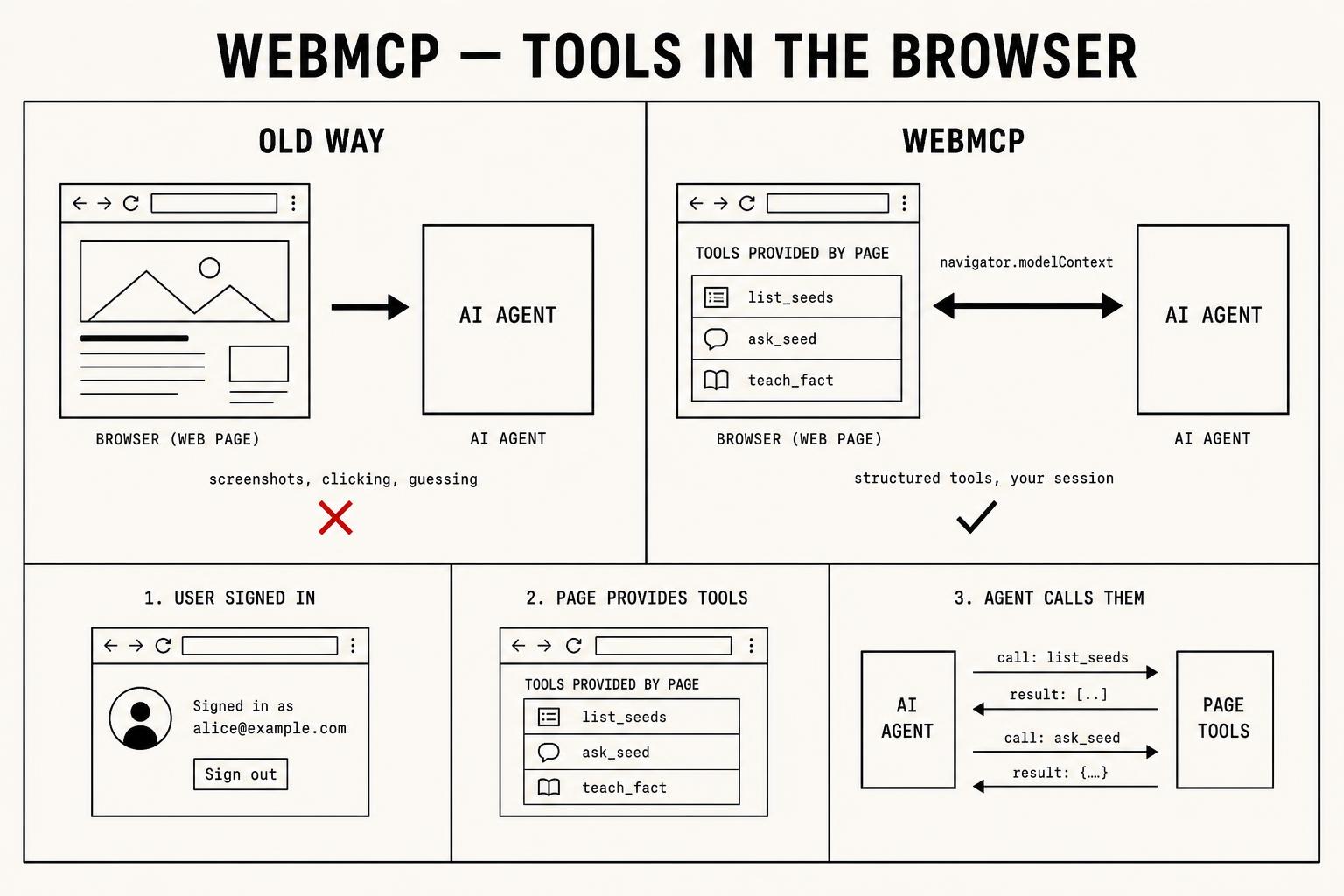
What WebMCP actually is
WebMCP is a draft specification from the W3C Web Machine Learning Community Group. It adds one small API to the browser: navigator.modelContext. A page calls it with a list of tools — each with a name, a description, an input schema, and a JavaScript function that runs when the tool is called. An AI agent operating in that browser can then read the list and call the tools directly.
The mental model is deliberately familiar. The Model Context Protocol already lets a remote assistant like ChatGPT or Claude connect to a server and call its tools. WebMCP is the same idea moved into the tab: the page is the tool server, and the client is whatever agent the user is running — a browser's built-in assistant, an agentic extension, or an agent-driven browser.
Why it matters
Four reasons, in the order we think they matter.
- Reliability. Pixel-driving is brittle. A CSS change, a cookie banner, a lazy-loaded list — any of them break an agent that navigates visually. A declared tool has a stable name and a typed input, so it either works or returns a clear error.
- Cost and latency. Vision-based automation burns tokens on screenshots and re-plans after every click. A tool call is one function invocation with a small structured result.
- Authority stays with the user. The tools run inside the user's own logged-in session. No API key to mint, no token to hand to a third party, no separate account for the agent. When the user signs out, the tools disappear.
- The site keeps control. The page decides which capabilities exist, what each one validates, and which ones require confirmation before writing. That is a far better safety boundary than "an agent can click anything a human can click".
There is a strategic point too. As agents start doing more of the browsing, sites that only speak in pixels become expensive to use and easy to get wrong. Sites that publish tools become the ones agents can actually operate — the machine-readable equivalent of having a sitemap instead of hoping crawlers guess your structure.
How it works, concretely
A page provides its tool list once the user's session is known, and re-provides it whenever that context changes:
navigator.modelContext.provideContext({
  tools: [
    {
      name: "ask_seed",
      description: "Ask a Seed a grounded question.",
      inputSchema: {
        type: "object",
        properties: {
          seed_id:  { type: "string" },
          question: { type: "string" },
        },
        required: ["seed_id", "question"],
      },
      async execute({ seed_id, question }) {
        const res = await askSeed({ data: { seed_id, question } });
        return { content: [{ type: "text", text: res.answer }] };
      },
    },
  ],
});
Three properties of that snippet are worth naming. The tool description is written for a model, not a human, because the model uses it to decide when to call. The input schema is the validation boundary. And execute is ordinary page code, so it inherits the same authentication and server-side checks as the UI — there is no second, weaker path into the data.
How Seedthink implements it
Seedthink already runs a remote MCP server at seedthink.ai/mcp for ChatGPT, Claude and Cursor. WebMCP is the local counterpart: the same intelligence, offered to whatever agent is in the tab. Any page of the app provides seven tools while you are signed in.
- list_my_seeds — find the right Seed to work with
- get_seed — identity, maturity, trust, fact count
- list_seed_facts — browse the verified facts inside a Seed
- ask_seed — a grounded answer from the resolver cascade
- teach_seed_fact — add knowledge, preview then confirm
- search_seedthink_marketplace — find published Seeds and Models
- open_seedthink_page — navigate this tab so you can see the result
Reads pass straight through. Writes do not: asking Seedthink to teach a fact first returns a preview of exactly what will be stored, and the agent must call again with an explicit confirmation to commit it. Everything still runs through the same ownership checks, row-level security and quotas as a human clicking the same button, and no tokens or credentials are ever exposed to the agent.
The honest caveat
WebMCP is a draft, not a shipped standard. Browser support is arriving behind flags and origin trials, and the API surface may still change. That is precisely why implementing it now is cheap: it is a few hundred lines that degrade to nothing on browsers without navigator.modelContext. Our Agent Integrations page shows a live badge telling you whether your current browser supports it.
The deeper reason we shipped it is that it fits what Seedthink is. A Seed is a growing, verified body of knowledge that is meant to be queried by other systems, not just read by a person. WebMCP removes the last bit of friction between an agent and that knowledge — no key, no setup, no screenshotting. Just ask.